For Shopify shops that reorder from suppliers
Know an order is latebefore the shelf is empty
Simply Restock works out what to reorder from your own sales and each supplier lead time, then flags an open order that lands after you run out.
14 day free trial · $19.99 a month after that · cancel from your Shopify admin.
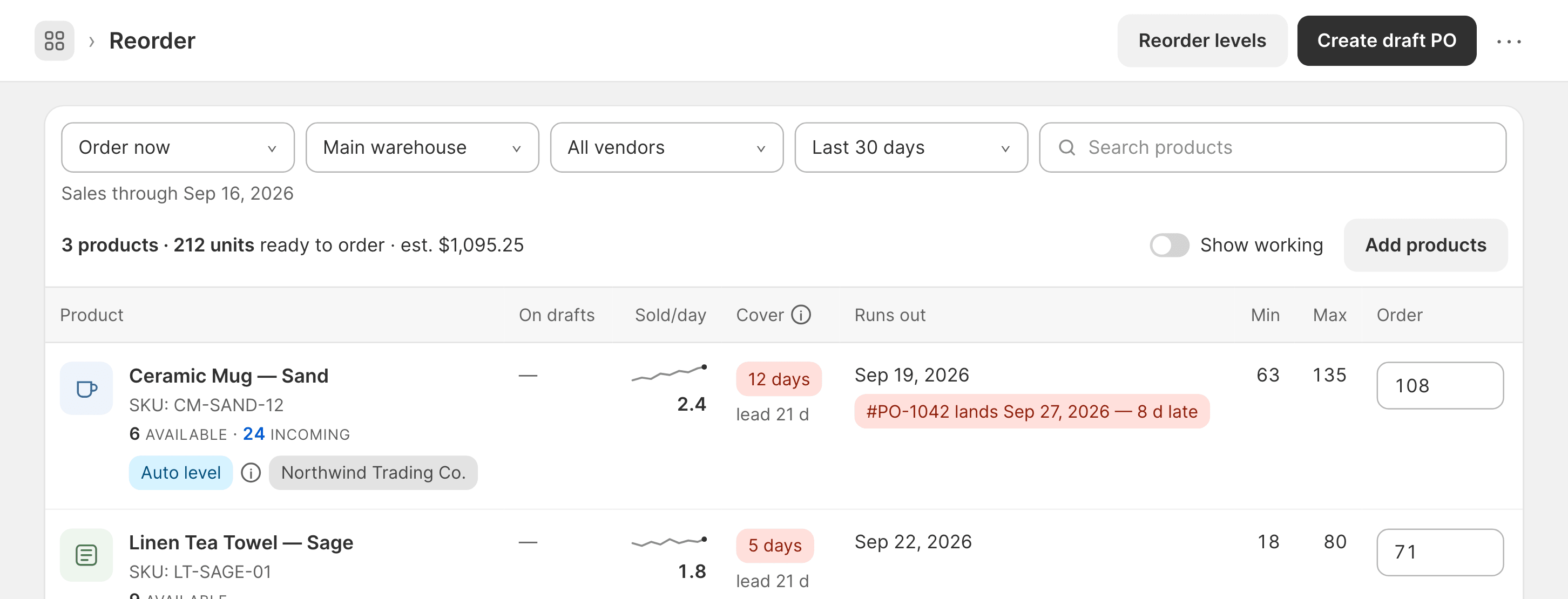
Ceramic Mug — Sand
CM-SAND-12 · 6 available
- Runs out
- Sep 19
- Order
- 108
#PO-1042 lands Sep 27 · 8 d late
What it costs
Restocking, made simple. All in one app.
$19.99/month
Every higher tier we add later is included in your $19.99
Forecasting and alerts already shipped inside it. $19.99 stays $19.99 for as long as you keep the app.
One plan. Everything’s included:
- Reorder list with a runs out date and a stockout warning on every product
- Unlimited purchase orders, emailed to suppliers as PDFs, received in parts
- Stocktake by barcode, stock adjustments with a reason and moves between locations
- Barcode scanning in the Shopify Mobile and POS apps or a hardware scanner
- A daily low stock email and answers inside Shopify Sidekick
- Import suppliers, costs and reorder levels from a spreadsheet, up to 10,000 rows
- No limits on products, orders, suppliers or locations
14 day free trial · billed by Shopify, on the invoice you already get · cancel from your Shopify admin, no email required
What to reorder
How many to order and why that number
Each line carries the date that product runs out and how many to order, worked out from your own sales and the supplier’s lead time. Turn on Show working and each line shows its arithmetic.
Why 108 units of Ceramic Mug?
- Minimum stock
- 2.4 a day × 26 days = 63
- 21 day lead time + 5 day safety stock
- Maximum stock
- 135 max − 6 available − 24 incoming = 105
- Pack size
- 105 rounds up to 108, in packs of 12
Order108
A number you typed always wins over a calculated one, field by field. The sales window is yours to pick: recent sales, dates you choose or the same days last year.
Every morning
The email that says what is running low
One email a day, at the hour you pick, in your shop’s time zone, to as many as five people. Each line carries the days left and how much to order, grouped by location.
Ask Shopify Sidekick the same questions in your admin: what to reorder, which deliveries land late, what is open with a supplier. It reports and links back into the app. It never creates or receives an order itself.
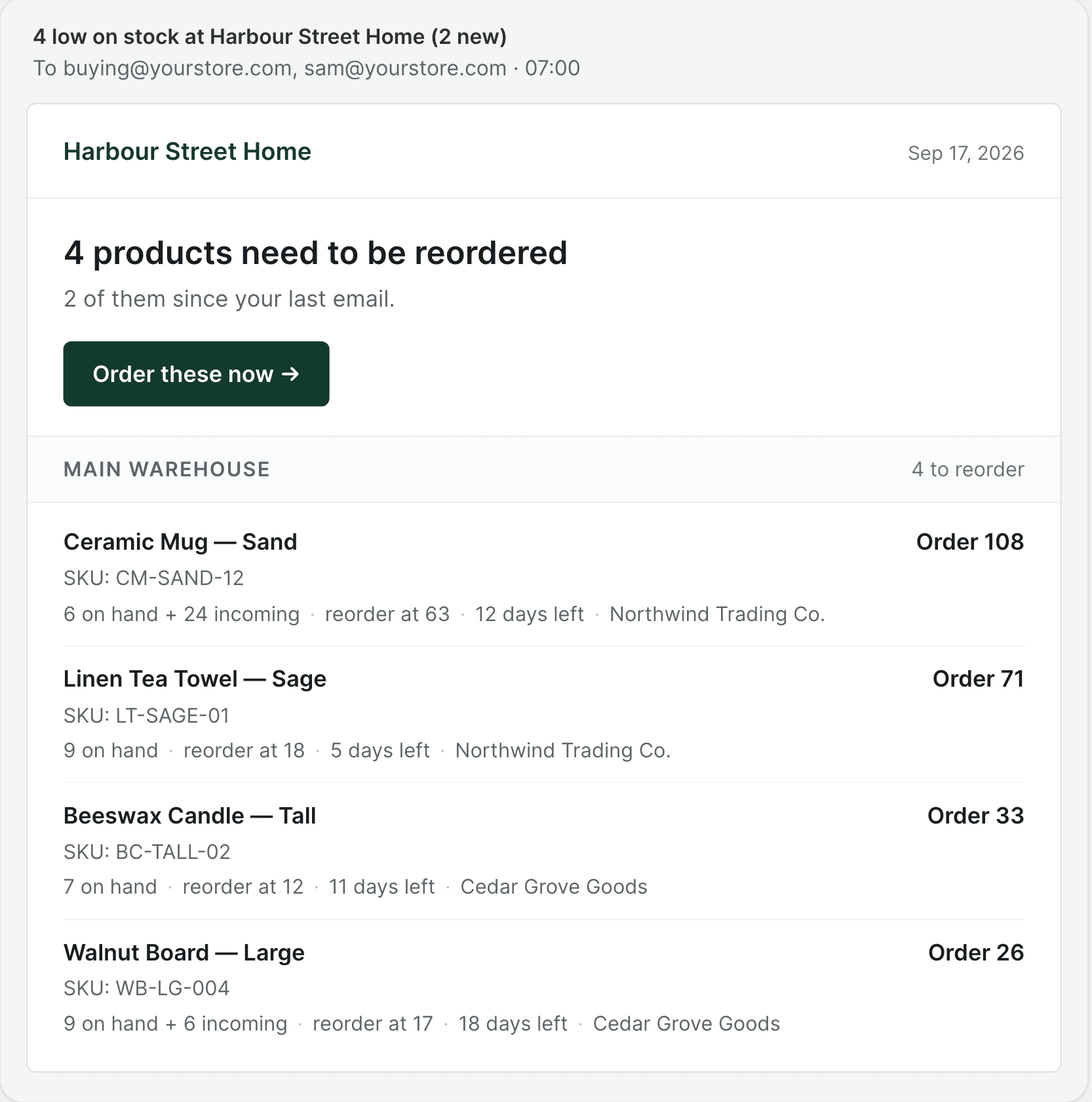
You should find out that an order is late while you can still do something about it, not on the morning the shelf is empty.
One document
One order, from draft to received
One purchase order carries the whole job, from the draft you build to the last box you count in, however many deliveries that takes.
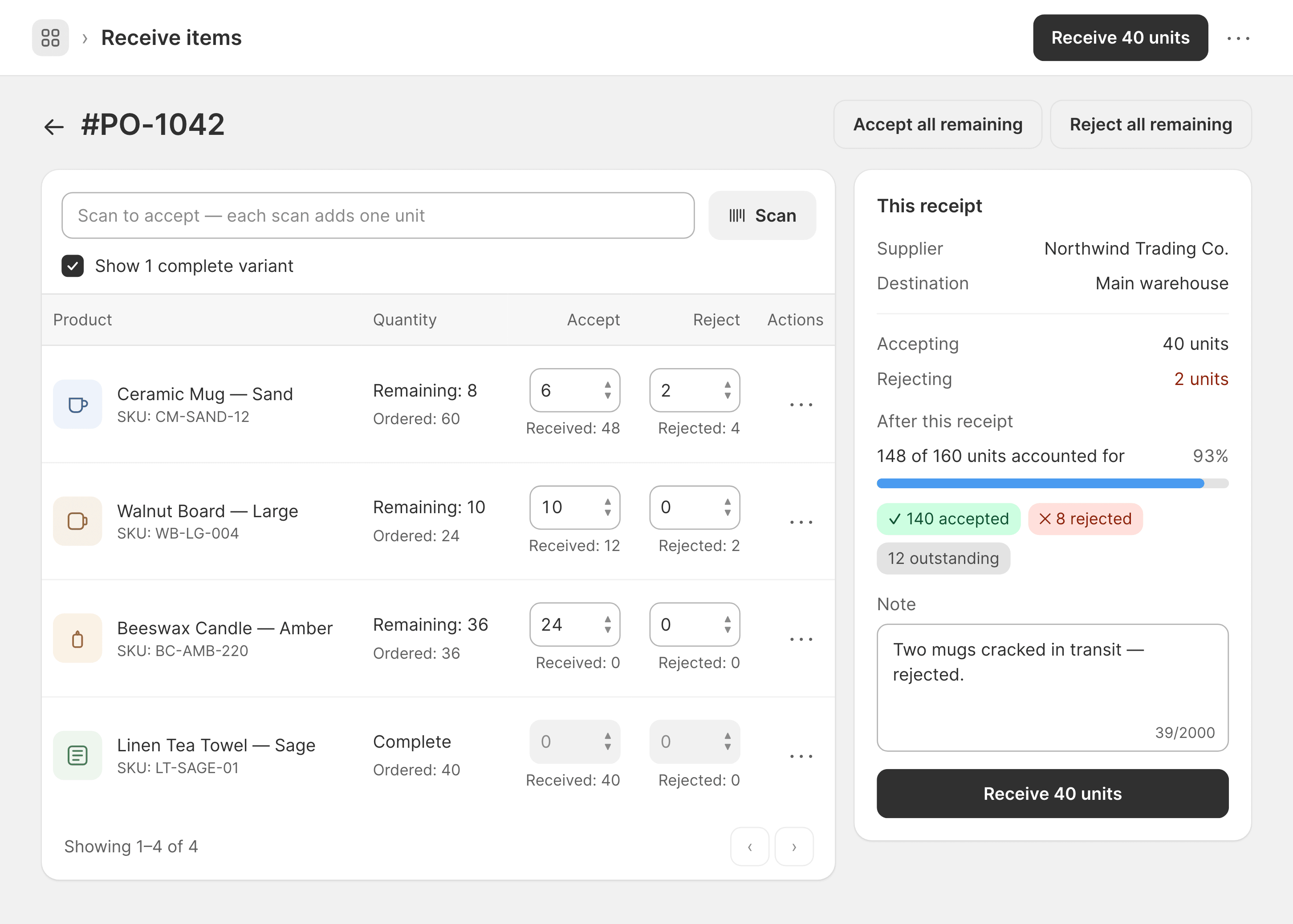
Accept and reject per line. Only accepted units become available stock. Rejected ones never enter it. You can close the order short when the rest is never coming.
Draft
Build the order
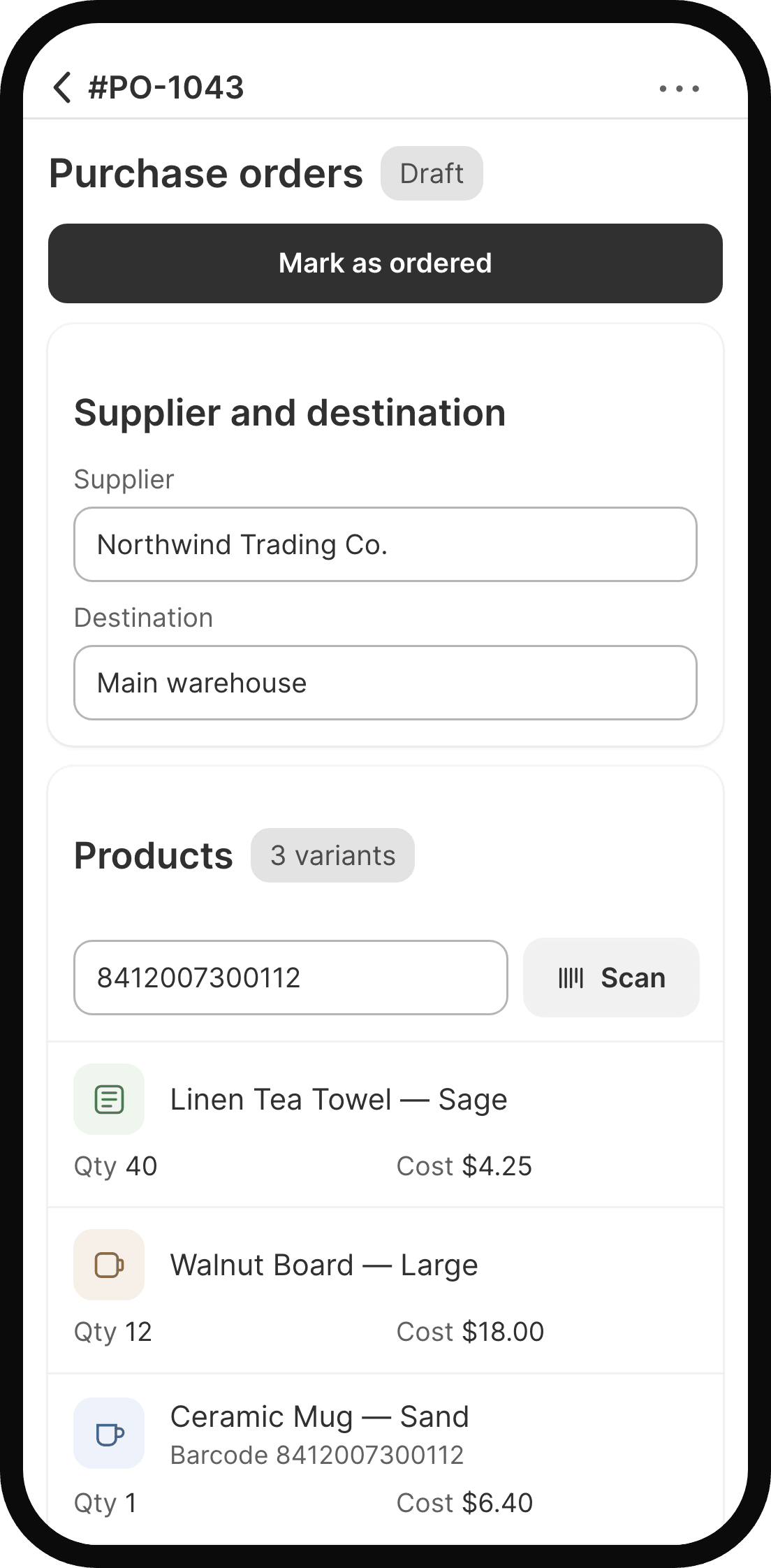
Pick a supplier and a destination, then add products with Shopify’s own picker or by scanning a barcode. Unit cost comes in prefilled.
Ordered
Shopify shows it coming
Units appear as incoming at that location, tagged to this order in its inventory history. Lines stay editable until the first receipt lands.
Received
Count what turned up
Over as many deliveries as it takes. Raise or lower a received line afterwards and stock follows both ways.
On the warehouse floor
Scan to count. See every difference first
Count first. Review every difference. Update only when you’re ready.
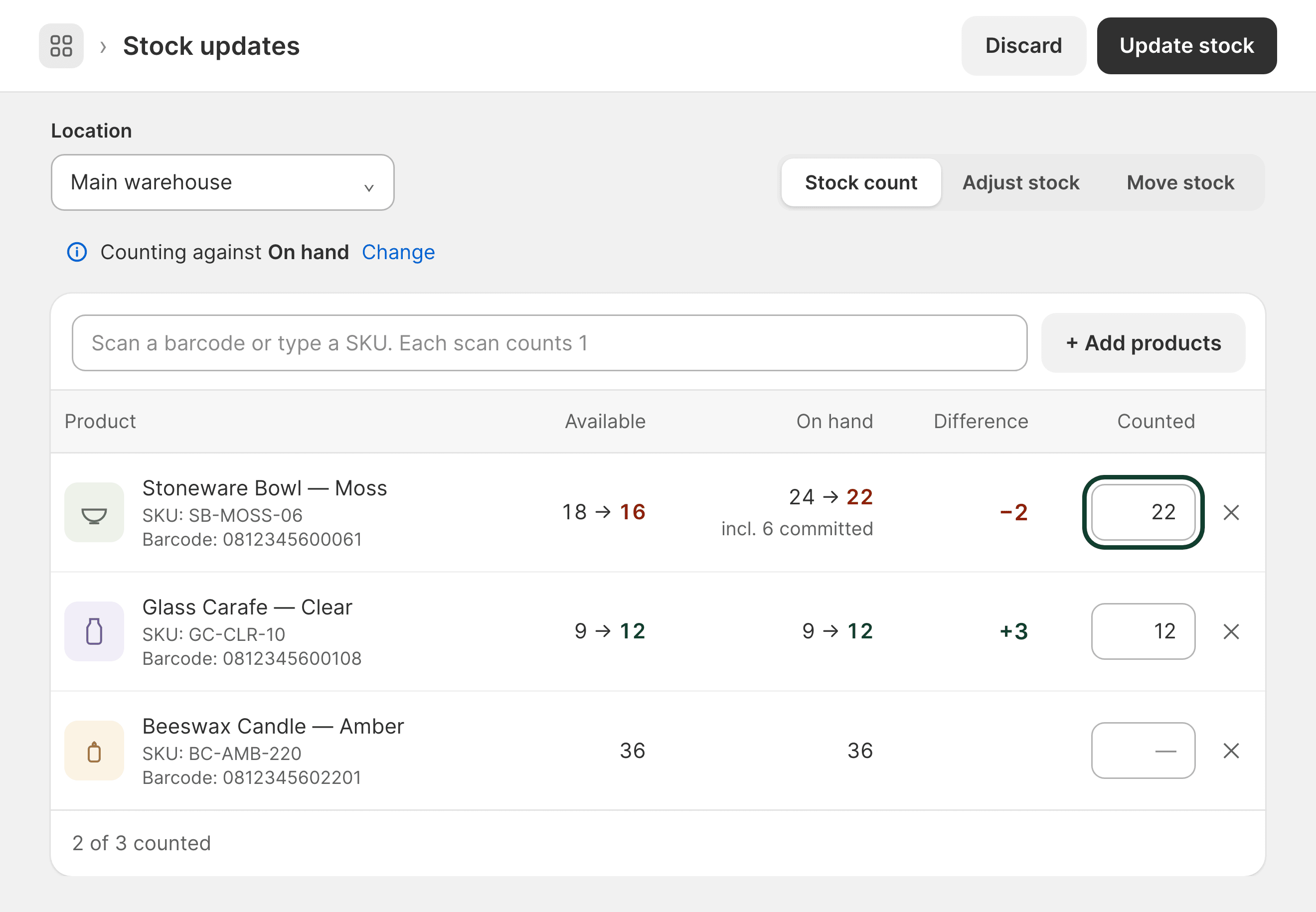
Only the products you counted change. If one sold while you were counting, it is held back and you decide which number stands. Every count is saved in Stock history, with a CSV and a PDF.
Count
Everything, one vendor or a few
Load a whole location or one vendor’s products, then scan. Count against on hand or available, whichever matches how your shelf works.
Adjust
Add or remove, with a reason
Damaged, lost, found, returned to supplier or a correction. The reason shows in Shopify’s inventory history beside the change.
Move
From one location to another
Scan what you are moving and it lands at the other location straight away. A product not stocked there yet is stocked first.
The same scan adds products to a purchase order and receives a delivery: the camera inside the Shopify Mobile and POS apps or any hardware scanner on any device. The browser admin cannot use the camera, because Shopify does not give embedded apps camera access there.
Setup
Start from the sheet you already have
Suppliers, supplier costs, pack sizes, lead times and reorder levels come across from a CSV or Excel file, up to 10,000 rows. Match your columns once, then check every row before anything is saved.
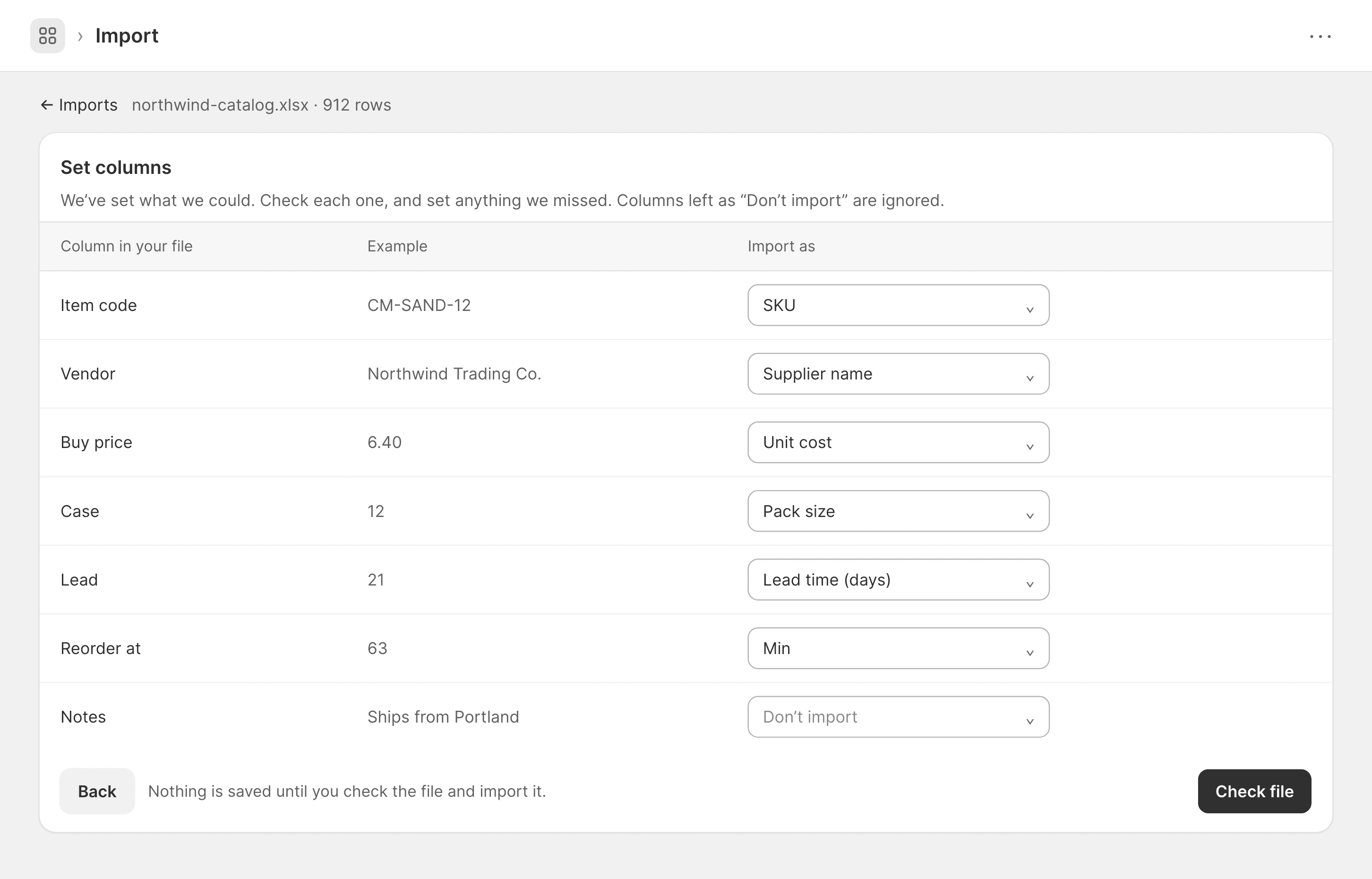
Past purchase orders are not imported. Importing your open ones, as drafts, is next on the roadmap.
Roadmap
What is being built next
Marked, so you always know what you are installing. No dates, because a date on an unbuilt feature is a promise rather than a plan.
- Next
Import your open purchase orders from a spreadsheet, as drafts
- Planned
Transfer orders with stock in transit between locations, received on the same screen
- Planned
Blind and scheduled stocktakes
- Planned
Blind receive, landed cost, split destination orders, currency per supplier
Everything above the line already shipped, inside the same plan. If one of these four is the thing you actually need, email support@sahajlabs.com and say which. It changes the order.
Who builds it
The person who answers your email wrote the code
I’m Hitesh. I build Simply Restock at Sahaj Labs: I write the code, answer the support email and decide what gets built next. Every merchant gets the same support, straight from me.
Questions
Before you install
How do I start?
Install it from the Shopify App Store and set your suppliers and their lead times. The reorder list then fills itself from your own sales history. The 14 day trial starts when you subscribe.
Is there a free plan and when am I charged?
There is no free plan. There is a 14 day free trial and nothing is charged while it runs. Cancel before it ends and you pay nothing. After that it is $19.99 a month on the Shopify invoice you already get, billed by Shopify rather than by us. You can cancel from your Shopify admin at any time.
Can I bring my suppliers and costs in?
Yes, from a CSV or Excel file, up to 10,000 rows. Suppliers, supplier costs and reorder levels come across. You match the columns and check every row before anything is saved. Past purchase orders are not imported.
What does it change in my inventory?
Ordering marks units incoming at the destination, receiving moves accepted ones to available and both are tagged to the order in your inventory history. Bin locations are saved to your products, as are unit costs if you turn that on. Forecasting reads your orders only after you allow it in Settings and never your customers’ names, emails or addresses.
Can I receive on a phone at the door?
Yes, with the camera inside the Shopify Mobile and POS apps or a hardware scanner on any device. It cannot work in the browser admin, because the admin does not grant apps camera access. The whole app opens in Shopify POS too, so the counter can receive a delivery without a laptop.
Can I do a stocktake?
Yes. Pick a location, scan or type what is on the shelf and every product shows the difference against Shopify before anything changes. Update stock sets the counted totals. A product that sold while you counted is held back for you to decide. Each count is kept in Stock history with a CSV and a PDF.
How many locations per order?
One destination per purchase order in this version. You can move stock between locations today and it lands straight away. Transfers with stock in transit are on the roadmap.
Take the next delivery on the order
Fourteen days free, then $19.99 a month on the Shopify invoice you already get.
Or email support@sahajlabs.com with a question first. The reply comes from me.